
How FastAPI Works Under the Hood (I Tested Every Claim)
I wrote the same endpoint twice. Same one-second wait inside. Ten requests at once.
The first version took 10.02 seconds to answer all ten. The second took 1.02 seconds.
The only difference was one word: async. And the slow one was the version with it.
Get free WordPress & AI tips
Join 500+ readers. No spam, unsubscribe anytime.
That surprised me enough that I wanted to understand how FastAPI works under the hood. So I asked an AI chatbot to outline it for me. It gave me a clean, confident outline: Uvicorn, Starlette, Pydantic, a request’s journey through all three.
Then I ran every claim in it on a lab box before trusting any of it. Most held up. Three didn’t. This post is the tested version, with the numbers, the code, and the three corrections.
Watch it instead
I made a video of this test: the same endpoint twice, the three claims checked against the source, and the thread pool hitting its ceiling on camera. Watch it on YouTube if you would rather see the numbers land than read them.
What You Need
- Python 3.12 (I used 3.12.3 on Ubuntu 24.04)
- The same versions I measured on, so your numbers match mine:
pip install fastapi==0.141.1 starlette==0.52.1 pydantic==2.12.3 uvicorn==0.52.4 httpx requests
- About 20 minutes. Everything runs locally. No API key, no cloud server.
Every timing below is the median of 5 rounds, on one Uvicorn process with 6 CPU cores. Before trusting the box, I timed two identical endpoints against each other. They came out 0.69% apart, so any big gap you see below is real, not noise.
How FastAPI Works Under the Hood: Three Layers
FastAPI isn’t one big engine. It’s a thin layer on top of three other projects, and each one has a job.
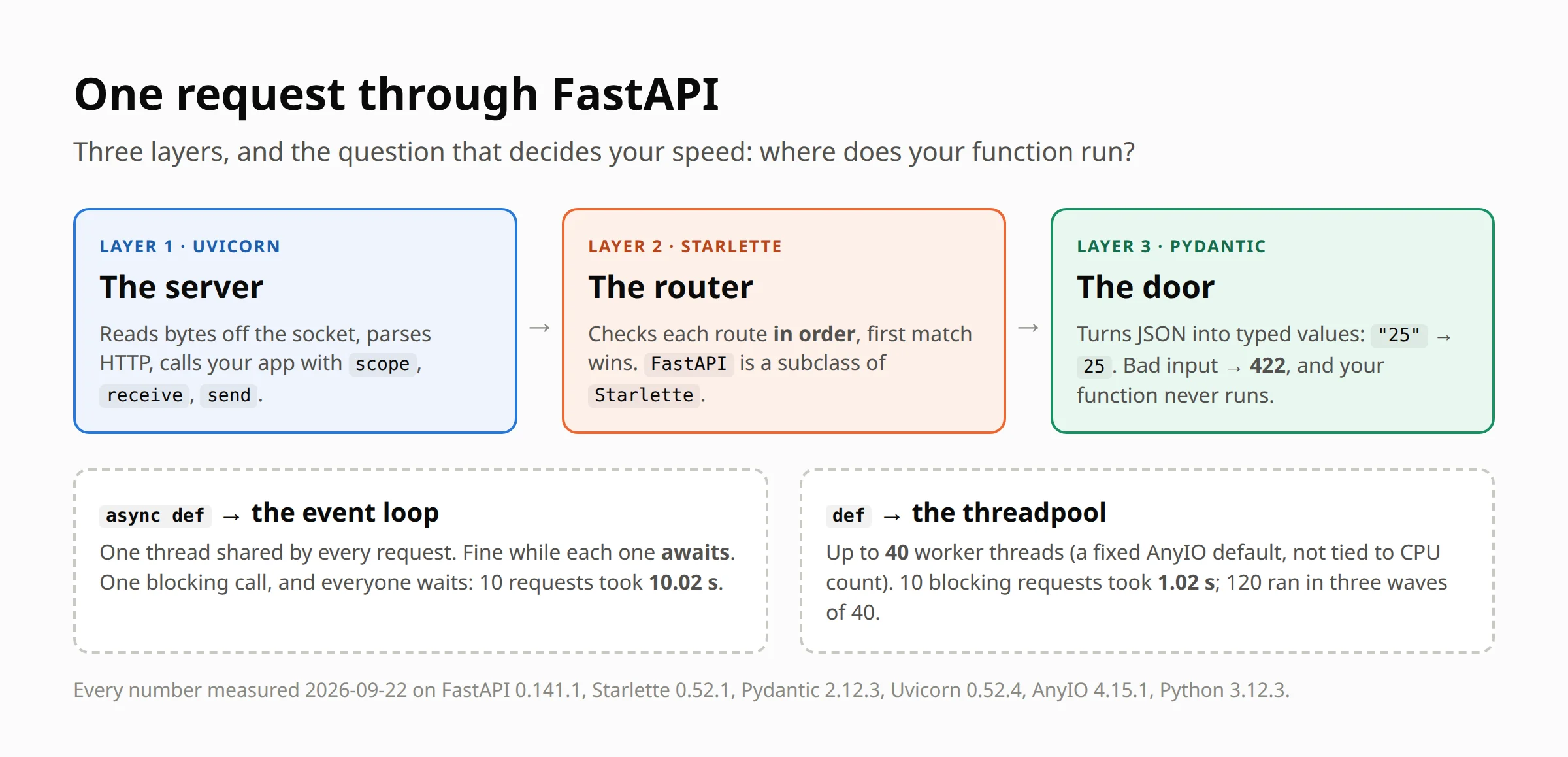
A request goes through them in this order:
- Uvicorn reads the raw request off the network.
- Starlette finds which of your functions should handle it.
- Pydantic checks and converts the data.
- Your function runs. Where it runs is the whole 10-second story.
Let’s go layer by layer.
Layer 1: Uvicorn and ASGI
Uvicorn is the server. It’s the part that actually listens on a port. FastAPI never touches the network itself.
Uvicorn talks to your app through ASGI, a standard contract for async Python web apps. The contract is tiny: Uvicorn calls your app with three things.
scope: a plain dictionary describing the requestreceive: an async function your app calls to read the request bodysend: an async function your app calls to send the response back
That’s the whole deal. To prove it, here’s an app with no framework at all. No FastAPI, no Starlette:
async def app(scope, receive, send):
    await send({
        "type": "http.response.start",
        "status": 200,
        "headers": [[b"content-type", b"text/plain"]],
    })
    await send({
        "type": "http.response.body",
        "body": b"Hello from raw ASGI!",
    })
I ran it with uvicorn raw_asgi:app --port 8001 and requested /hello?x=1. It answered 200 with Hello from raw ASGI!.
My version also saved the scope it received, and it’s refreshingly boring. Here’s what Uvicorn actually handed over (trimmed to the main keys):
{"type": "http", "http_version": "1.1", "method": "GET", "path": "/hello",
 "query_string": "x=1",
 "headers": [["host", "127.0.0.1:8001"], ["accept", "*/*"],
             ["accept-encoding", "gzip, deflate"], ["connection", "keep-alive"],
             ["user-agent", "python-httpx/0.28.1"]],
 "client": ["127.0.0.1", 52838], "server": ["127.0.0.1", 8001]}
Everything FastAPI gives you, like path parameters, JSON bodies and response models, is built on top of that one dictionary and two functions.
💡 One more piece matters later. Uvicorn runs an event loop: a single thread that juggles many requests by switching between them whenever one is waiting. It only switches at an await. Keep that sentence in mind.
Layer 2: FastAPI Is Starlette
Starlette is a small async web toolkit. It does routing, middleware, cookies, WebSockets and background tasks.
FastAPI doesn’t wrap Starlette. It is Starlette, extended. I checked:
>>> from fastapi import FastAPI
>>> from starlette.applications import Starlette
>>> issubclass(FastAPI, Starlette)
True
The class hierarchy is exactly FastAPI → Starlette → object.
Correction #1: the router is a list, not a “radix tree”
The AI outline said Starlette uses a radix tree router, a clever data structure that finds a route without checking them all. When I searched to double-check, the search engine’s own AI summary said the same thing, and listed a blog post among its sources that, when I actually read it, doesn’t say that at all.
So I read Starlette’s source instead. The router’s main method is a plain loop:
for route in self.routes:
It checks your routes one by one, in the order you declared them, and the first full match wins. The words “radix” and “trie” don’t appear anywhere in starlette/routing.py. Litestar, a different framework (it was called Starlite when those docs were written), does use a radix tree, and its docs say so while pointing out that Starlette uses regex matching instead.
For small apps, a loop is fast enough and you’ll never notice. But “in order” has a real consequence:
@app.get("/users/{user_id}")
def get_user(user_id: int):
    return {"user_id": user_id}

@app.get("/users/me")        # declared second
def get_me():
    return {"me": True}
GET /users/me never reaches get_me. The first route matches the path, then fails to turn "me" into an integer, and you get this real response:
{"detail": [{"type": "int_parsing", "loc": ["path", "user_id"],
  "msg": "Input should be a valid integer, unable to parse string as an integer",
  "input": "me"}]}
The fix is to declare the fixed path (/users/me) before the one with a parameter.
Layer 3: Pydantic at the Door
Starlette hands FastAPI raw strings and bytes. Pydantic is the library that turns them into real Python types, using the type hints you already wrote.
class UserPayload(BaseModel):
    name: str
    age: int

@app.post("/users")
async def create_user(user: UserPayload):
    return {"user": user, "age_type": type(user.age).__name__}
Three requests, three real results:
{"name": "Ann", "age": "25"}→200, andagearrives as the integer25. Pydantic coerced the string for you.{"name": "Ann", "age": "twenty"}→422, with"type": "int_parsing","loc": ["body", "age"],"input": "twenty".{"name": "Ann"}→422, with"type": "missing","msg": "Field required".
A 422 means “I understood your request, but the data is wrong.” In both failing cases, my function never ran. I wrote zero validation code.
Correction #2: /docs is not built at startup
The outline said FastAPI builds its automatic /docs page (the OpenAPI schema, a JSON description of every route) at startup.
I checked app.openapi_schema right after the server started: empty. After the first request to /openapi.json: built. FastAPI’s own source says it: the schema is generated the first time it’s asked for, then cached.
It sounds like trivia, but it isn’t. If you ever customise the schema, or wonder why the first /docs load is the slow one, this is why.
Where Your Function Runs: FastAPI async def vs def
Now the 10-second mystery. FastAPI looks at how you wrote your endpoint and makes a decision:
async def→ runs directly on the event loop. The one shared thread.- plain
def→ FastAPI sends it to a threadpool, a group of spare worker threads, so it can’t hold up the loop.
Here’s the experiment. Three endpoints, each waiting one second:
@app.get("/sleep/async-blocking")
async def sleep_async_blocking():
    time.sleep(1)            # blocks the event loop thread

@app.get("/sleep/def")
def sleep_def():
    time.sleep(1)            # blocks one threadpool thread

@app.get("/sleep/async-await")
async def sleep_async_await():
    await asyncio.sleep(1)   # gives control back to the loop
Ten requests at each, all at once:
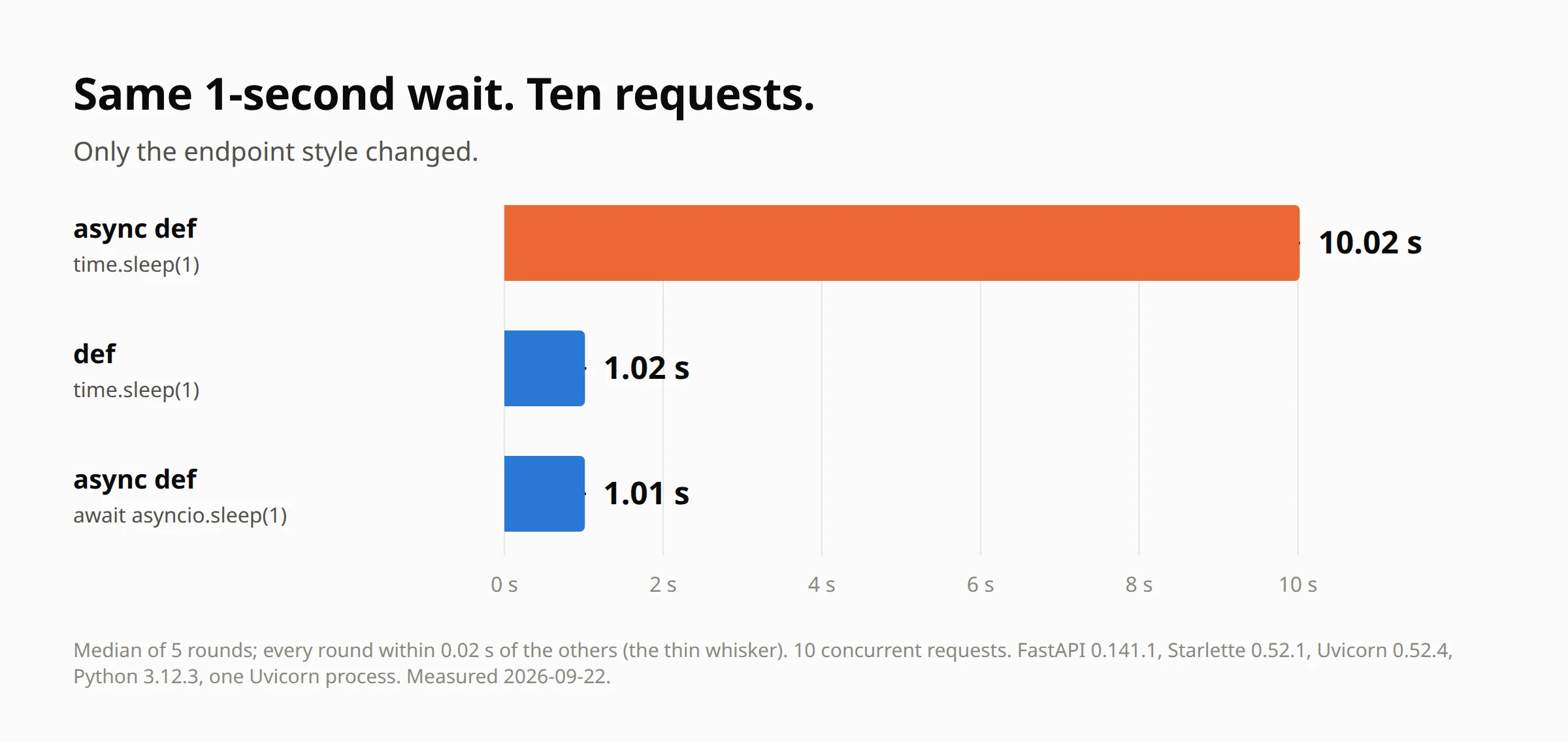
The real output from the first round:
round 1  async def + time.sleep             x10    10.023 s
round 1  def + time.sleep                   x10     1.016 s
round 1  async def + await asyncio.sleep    x10     1.014 s
Remember the sentence from Layer 1: the loop only switches at an await. time.sleep(1) has no await, so it freezes the event loop for a full second. Request two waits for request one. Request ten waits for all nine. That’s a FastAPI blocking event loop, and it’s the 10 seconds.
Writing async def is a promise to FastAPI: nothing in here will block. Break it, and every request on the server pays.
The version you’ll actually write
Nobody puts time.sleep in a real endpoint. But if you build AI tools, you do this all the time: call an AI API and wait for the answer.
So I set up a local stand-in for an AI API that answers every call after exactly one second, and called it three ways:
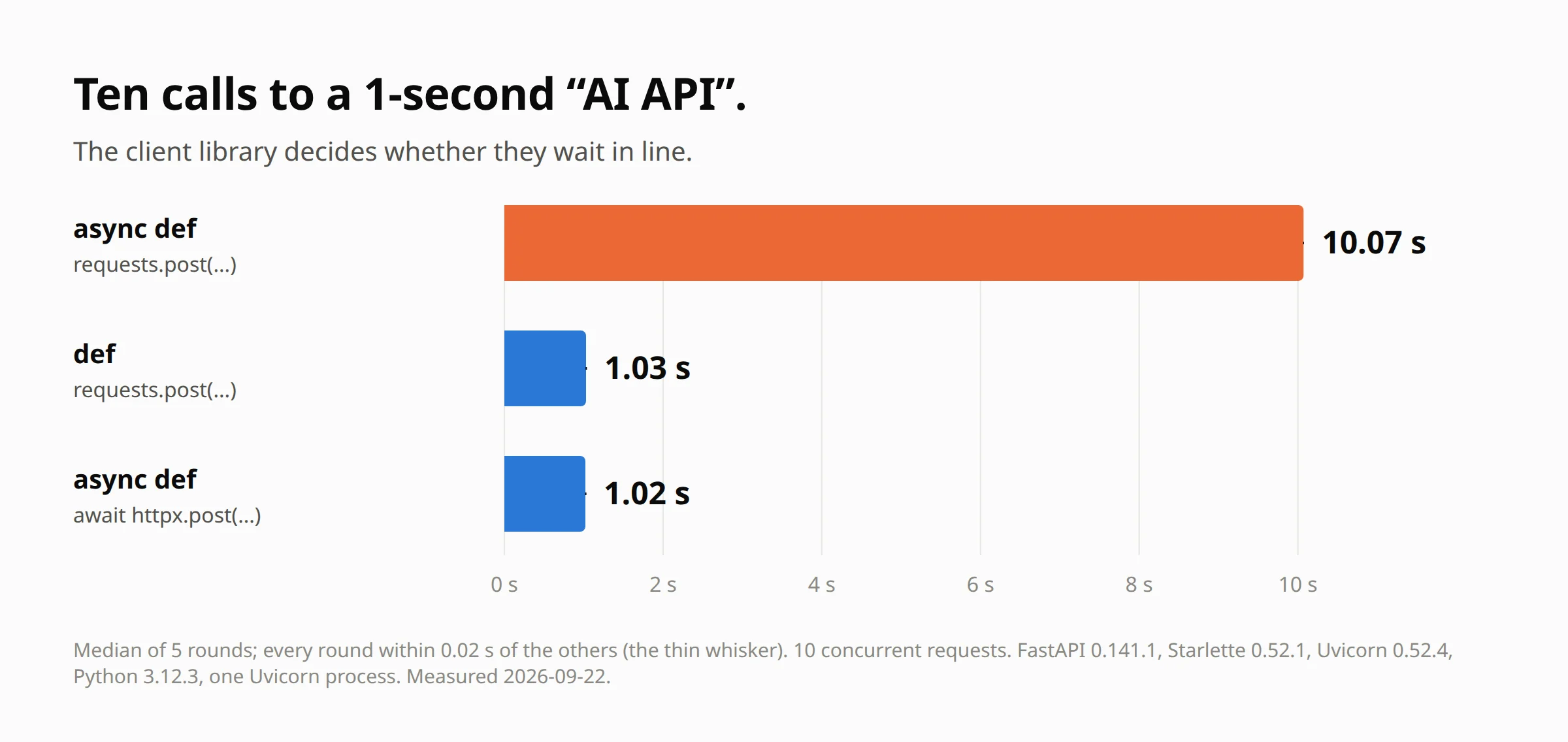
requests.post(...)insideasync def→ 10.07 srequests.post(...)insidedef→ 1.03 sawait httpx.AsyncClient().post(...)insideasync def→ 1.02 s
requests is a synchronous library: it blocks exactly like time.sleep. The same goes for any AI client you call without await. If you’re calling one from async def, you’ve built the 10-second version.
If you want to see that pattern in a real app, I built a FastAPI + OpenAI title generator in this video.
The FastAPI Threadpool Has a Ceiling: 40
def endpoints are safer, but the threadpool isn’t infinite. It has 40 threads.
I sent 120 requests to the def endpoint and had each one report the moment a worker thread actually started it:
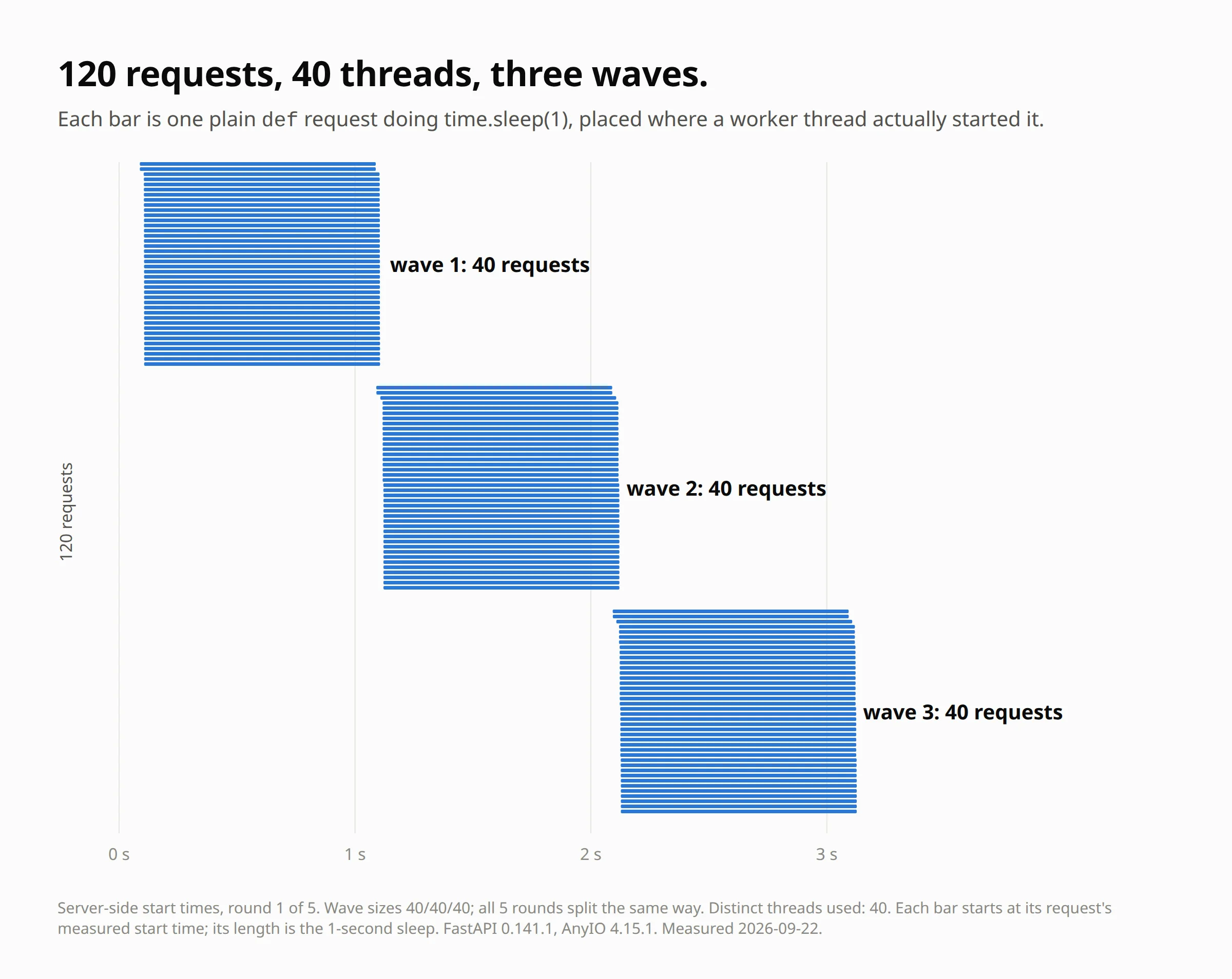
x120 total 3.236s threads 40 waves [40, 40, 40] starts [0.088, 1.09, 2.093]
Forty start immediately. The next forty start when the first forty finish, one second later. Then the last forty. All five rounds split exactly the same way, and no burst ever used more than 40 distinct threads.
Correction #3: 40 is not “your cores × 5”
The one guide I found that measured this explains the 40 as your CPU cores times five. My box has 6 cores. Six times five is 30, and Python’s own thread pool would default to 10 here. Neither is 40.
The number is a hardcoded default in AnyIO, the library Starlette uses to run threads:
limiter = CapacityLimiter(40)
To be sure, I ran the same test again with the server pinned to just 2 CPU cores. The waves didn’t move: 41 requests took 2.076 s on 2 cores and 2.077 s on 6.
What didn’t work at first
My first try at measuring this was wrong, and I nearly published it.
I timed the bursts from the client, with one shared HTTP client for every burst. Round 1 looked perfect. From round 2 on, 40 requests suddenly took 1.85 s instead of 1.09 s. That looked like FastAPI slowing down after a big burst.
It wasn’t. The client was reusing connections the server had already started closing, and one test crashed with an httpx.ReadError that pointed straight at it. Timing on the server side, with a fresh client each time, gave the clean waves above. If you benchmark this yourself, time it on the server.
Comparison: Which Endpoint Style Should You Use?
| You wrote | It runs on | A blocking call inside does this | 10 requests took |
|---|---|---|---|
async def + time.sleep / requests |
the event loop | freezes every request | 10.02 s / 10.07 s |
def + time.sleep / requests |
the threadpool (40) | blocks one thread only | 1.02 s / 1.03 s |
async def + await (asyncio, httpx) |
the event loop | nothing, it gives control back | 1.01 s / 1.02 s |
The rule: use async def only when every slow thing inside is awaited. Otherwise use plain def.
Common Mistakes (and How to Avoid Them)
- A sync client inside
async def.requests, a sync database driver, a sync AI SDK. Switch to the async version andawaitit, or just usedef. - Heavy CPU work in
def, expecting threads to help. They don’t. One CPU-heavy request took 0.54 s; four at once took 2.20 s, four times longer, because Python’s GIL (a lock that lets only one thread run Python code at a time) makes them take turns. - Fixed routes declared after parameter routes.
/users/meafter/users/{user_id}returns a 422. Put fixed paths first. EmailStrwithout its extra.from pydantic import EmailStrworks, but a model using it fails withImportError: email-validator is not installed, run pip install 'pydantic[email]'. Installpydantic[email].- Trusting an outline, AI or human, without running it. Three of the claims I was handed were wrong, and they sounded exactly as confident as the right ones.
Frequently Asked Questions
Is FastAPI just Starlette?
Yes, in the literal sense: issubclass(FastAPI, Starlette) is True. FastAPI adds the type-hint magic on top: Pydantic validation, dependency injection, and the automatic docs.
What does Uvicorn actually do?
It’s the server. It reads the request off the network, builds the scope dictionary, and calls your app with scope, receive and send. That’s the ASGI contract.
Should I use async def or def in FastAPI?
async def if everything slow inside is awaited. Plain def if anything inside blocks, like requests, a sync database driver, or file work. When in doubt, def is the safer default.
Why is my FastAPI app slow with async def?
Almost always a blocking call inside it. One blocking call freezes the event loop for everyone. In my test that turned 1 second into 10.
How many threads does FastAPI use for def endpoints?
40 by default, from AnyIO’s CapacityLimiter(40). It doesn’t change with your core count: 2 cores and 6 cores gave the same waves.
When does FastAPI build the /docs schema?
On the first request to /openapi.json, not at startup. After that it’s cached.
Wrap-Up: The Limit That’s Left
Understanding how FastAPI works under the hood comes down to one question: which layer runs my function? Get that right and the 10-second bug disappears.
But one Uvicorn process still has one event loop and 40 threads. Past that, and for CPU-heavy work the GIL won’t share, the answer isn’t in your code any more. It’s more processes, which is a deployment question. That’s where I’m taking this next.
If you’re new to FastAPI, start with your first endpoint. If you’re still choosing a framework, here’s why I picked FastAPI over Flask, Django and Node.js.
Now go build it. 🎯
Last verified: 2026-09-22 on FastAPI 0.141.1, Starlette 0.52.1, Pydantic 2.12.3, Uvicorn 0.52.4, AnyIO 4.15.1, Python 3.12.3.
Ready to use these workflows yourself?
Download ready-made tools, code packs, and AI resources — tested on real WordPress sites and Coolify servers.
Browse the Store